How to send SMS from VoIP services ?
How to send SMS from VoIP services?
Australian Phone is proud to offer two-way SMS functionality across all of our services, including Residential, Cloud PBX, and SIP Trunking. An Australian mobile DID number (starting with 614) is required to receive incoming SMS messages, as Australian landline numbers (starting with 612, 613, 617, or 618) are not capable of receiving SMS messages. International mobile numbers can also be activated on your account to receive SMS messages. However, sending SMS from international numbers may be limited or restricted, depending on the regulations and carrier policies in the destination country. Please note that SMS messages are sent and billed in 160-character segments. Messages longer than 160 characters are automatically split into multiple segments, with each segment sent and charged as a separate SMS. Messages containing non-English characters (such as Cyrillic, Chinese, Arabic, or emoji) use Unicode encoding, which significantly reduces the number of characters that fit into a single SMS segment. As a result, these messages may be split into additional segments and incur higher charges, even if the visible message appears relatively short.
- Residential Services:
SMS may be sent via any app with SMS support, such as: AusPhone, Acrobits, Zoiper, Linphone. The destination number is simply entered into the app, and the text is sent. If the customer has a 614 Australian Mobile number on the service, this number will be used as the sender ID, and the response will be received. Alternatively, the landline number will be presented as the sender, but responses cannot be received on the landline number. When the response is received, the app will show the incoming text as normal. A copy of the incoming message will be sent to the user's email address, just in case the mobile app is not registered.
- SIP Trunking Services:
- Cloud PBX Services:

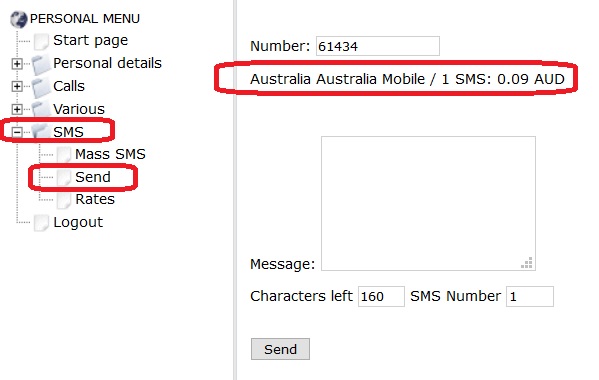
- In case there is no app in use or it cannot be used at the moment, an SMS may be sent from the Billing Portal. However, the sender ID from the billing portal will always be "AusPhone", not an individual number:
To send an SMS, you need to log in to "VoIP MY ACCOUNT", click on SMS > Send and type the number and message. The number should be typed in international format without any leading 0, +, etc. For example, Australian is typed as 614XXXXXXXX. Once the number is entered, the system will prompt the price for the destination. Please refer to the image below:

- Via Email, for all Services:
1. Send an email to This email address is being protected from spambots. You need JavaScript enabled to view it., where number is the destination number for SMS, for example, This email address is being protected from spambots. You need JavaScript enabled to view it.
2. Don't type any letters, spaces or anything else before the @ sign, just the phone number
3. Type SMS text in the email body, no pictures, just a text.MMS is not supported.
4. Subject line is ignored; maximum number of characters is 800
5. Email must be sent from your account email address, which is inside MY ACCOUNT > Personal Details> Email. Make sure the email matches, as incorrect emails are ignored without a reply.