How to send FAX from Email ?

How to use E-mail to FAX service

     Australian Phone Company provides email-to-fax services for every account. That means that you may send a FAX email file in PDF to us, and it will be sent as a fax. FAX call will be billed the same as any voice call for your account, according to your tariff plan and destination. Please find below instructions on how to use this functionality.

Option 1: 


1. Send an email to This email address is being protected from spambots. You need JavaScript enabled to view it., where number is the destination number to which to send a fax, for example, 0399998288

2. Don't type any letters, spaces or anything else before the @ sign, just the phone number

3. Attach the file you want to send as a fax in PDF/TIF format; multiple PDFs/TIFs are supported, and all attached files will be sent to the single destination number.

4. You may add any additional information to the "Subject" line, which will be used in the email with FAX transmission results.

5. Send an email from your account email address (Authentication to the account is done by email)

6. The system will return an email with FAX transmission results for each attachment.

Please see an example:


new fax email


Option 2: 

1. Send an email to This email address is being protected from spambots. You need JavaScript enabled to view it.

2. In the subject line of this mail, type the phone number where to send a fax, for example, 0399992888

3. Don't type any letters, spaces or anything else into the subject field, just the phone number

4. Attach the file you want to send as a fax in PDF format, only PDF is supported.

5. Send an email from your account email address (Authentication to the account is done by email)

6. The system will return an email with FAX transmission results.

Please see an example:
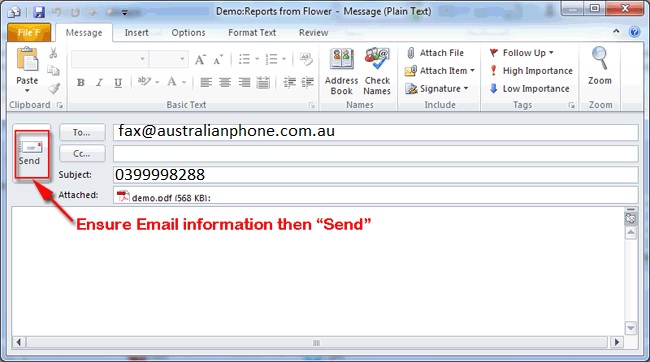
fax send


address (Authentication


facebook share  Share your experience about us in your Socials !

   
© AUSTRALIAN PHONE COMPANY 2011-2022
...